
The AI Agent Blueprint
What's the difference between an LLM-powered workflow and AI Agent? What is the agent architecture? Let's figure out together.

Key Idea
Traditional software follows predefined paths: the frontend makes an HTTP Request, the backend queries the database, transforms the result into JSON format and yields a response. Any variation is handled by if-else or switch statements.
The problems like evaluating if a Jira ticket has enough information for creating test cases may hardly be solved with if-else statements. Sounds more like a job for an LLM.
People build UiPath, Zapier or n8n workflows where the flow is predefined, but one or several steps are using LLMs. For the Jira ticket example, we can build one like this:
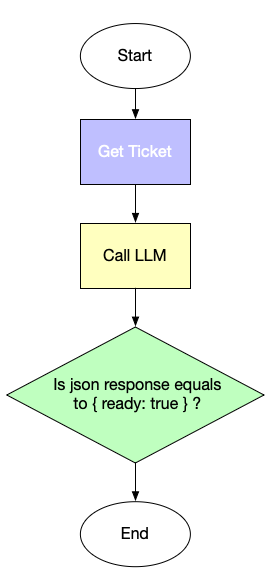
This is not an agent: this is a workflow. We just solve one step of it with an LLM. The LLM is not in the control. However, LLMs are powerful: they can generate texts, write code, analyse Jira tickets, summarise meeting transcripts. They can also make decisions. What if we grant them the power to decide what to do?
Here’s the key idea:
Let’s ask an LLM what step to take. LLM will tell us what tool to call, and what parameters to pass to this tool. Our job is to call the tool, feed the result back and ask what step to take next.
Now let’s dig into the details.
System Prompt
Every agent begins with a system prompt. The purpose of the prompt is to tell the agent what it is supposed to do. This is where you provide an agent role, the end results, guidelines and tools. If your agent was an employee, system prompt is the job instruction. For example(shortened and simplified):
“You’re a senior technical writer. Create technical documentation for our software product and generate appropriate diagrams. Make sure the diagrams are clear and comprehensible. The technical documentation should include architecture decisions, API contracts and addressed non-functional requirements”.
Typically this is your AGENTS.md/CLAUDE.md file or any other file that you pass to an agentic framework; more on them later.
The real system prompts though are typically much longer and elaborate; they should include not only the end results, but also the available tools, references to subagents, guidelines and guardrails. Talking about tools: why we need them and what they are?
Tools
A majority of software solutions exchange data with a database, read and write files, call APIs and take other actions in external world. In AI Agents these capabilities are implemented as tools: dedicated instruments to perform a certain job. Formally we can define a tool as the following set:
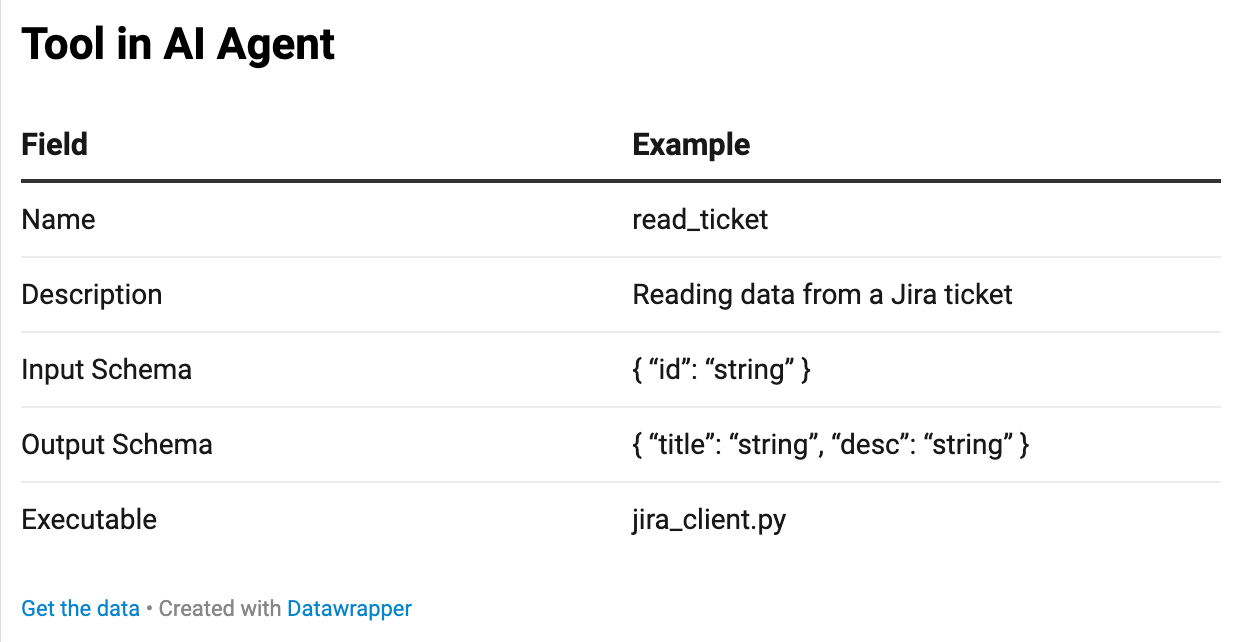
Let’s imagine we want to query Jira Issue Tracker for the content of a certain ticket. First, we need to create a script which sends an API request to Jira. Then we need to understand what parameters we pass into the script, and what we get back. That’s schema. And finally the tool should have a name and description to be useful for our LLM.
We can add more tools: like connection to code storage or a knowledge base. For example, we might want our LLM to read Notion pages to learn more about the product.
But how the LLM is going to know about the tool in the first place? Right, we need to tell LLM about available tools in system prompt. Here’s how it looks like:
### Your tools
‘read_tickets’ | Queries Jira for a ticket’s title, description and comments by id
‘notion’ | Queries Notion Knowledge Base for the additional product information.
If you’re building your AI Agent using Claude Code, there is no need to specify the contract strictly, however it’s still beneficial for efficiency.
Here’s a profound difference between an AI powered workflow and an agent: now LLM controls what to call and when instead of us. Rather than making the LLM a tool, we make LLM think which tools to call.
Of course, direct API integration is not the only way to add tools to LLMs. You likely heard of MCP - Model Context Protocol. It is even more convenient, because if a tool exposes an MCP Server, it becomes a matter only of configuration and authentication. Notion for example, exposes one. Here’s how to add it.
State
LLMs themselves are mere token predictors, thus they got neither memory, nor state. So our agent should solve the problem of providing both. Consider state: as the LLM does not know if the ticket was already queried, it will query it again which makes no sense. Here’s how it’s solved in AI Agents.
First we define what state we need: in our case it should indeed have the ticket id, the ticket content, content of relevant notion pages, etc. A JSON object will work just fine:
class QAAgentState(TypedDict):
ticket_id: str
ticket_data: dict
user_decision: str | None # “replace” | “supplement” | “skip”
notion_queries: List[str]
notion_search_results: List[dict]
notion_pages: List[dict]
user_feedback: str | None
What happens to state? Our AI Agent will update the state after every LLM interaction and will pass this state to an LLM together with the system prompt. Then LLM will know at what step it is because again: LLM is stateless itself.
Memory
AI agents maintain Short-Term Memory (STM) for the current conversation and Long-Term Memory (LTM) for persistent knowledge. STM functions like human working memory: temporary, conversation-bound, and used for immediate reasoning. It typically includes the conversation history, tool outputs, system prompts, working state, file diffs, and injected artifacts.
Agent frameworks construct prompts by combining these elements with the latest user message. Tools such as LangChain Checkpointer store conversation state using a key-value store tied to a thread_id. However, context windows are limited, even in modern models with up to ~1M tokens, so conversations must sometimes be summarized or compressed.
Important insights discovered during interactions—such as recurring mistakes or learned preferences—should be saved to Long-Term Memory. Systems like Claude Code persist this memory in files (e.g., project_memory.md, decisions.md) or dedicated memory folders that the agent reads at session start. Frameworks like LangGraph implement persistent memory using Stores (e.g., PostgreSQL, MongoDB) and Namespaces for organizing data.
In practice, STM keeps the agent coherent within a session, while LTM preserves important knowledge across sessions. Together they enable AI agents to behave consistently and improve over time.
Agent Loop
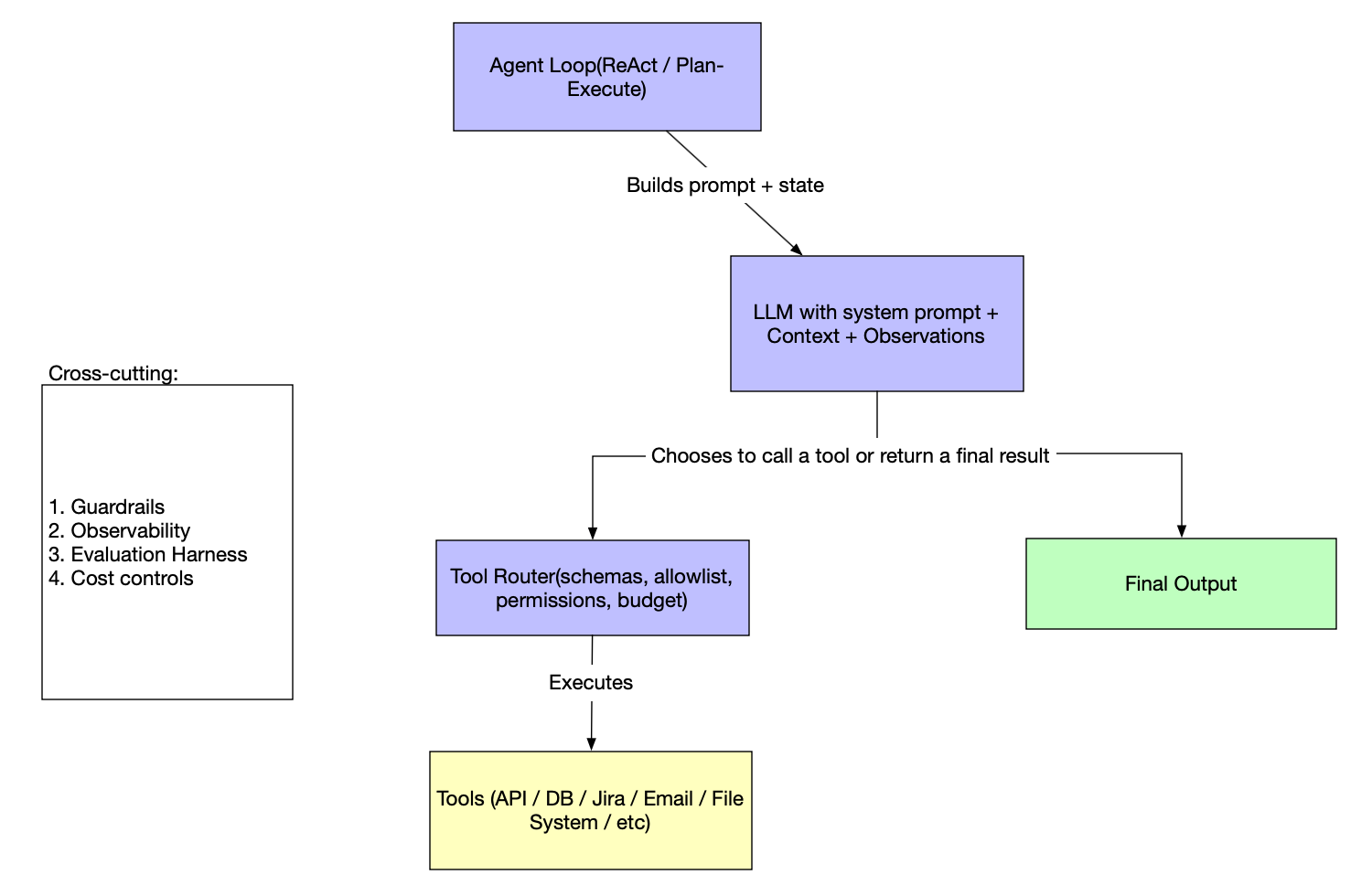
How it all works together? Any AI agent operates the loop:
take the system prompt, add the state and memory
send a request to LLM
parse a response
if this is final output, finish work
otherwise, determine which tool to call
Call the tool
Update the state and memory
Start from Step 1
That’s the whole blueprint. However, as any software systems, it requires cross-cutting concerns to be addressed.
Observability
Proper introspection is a must for any system. Let’s see how to add observability to see what our agent is doing under the hood.
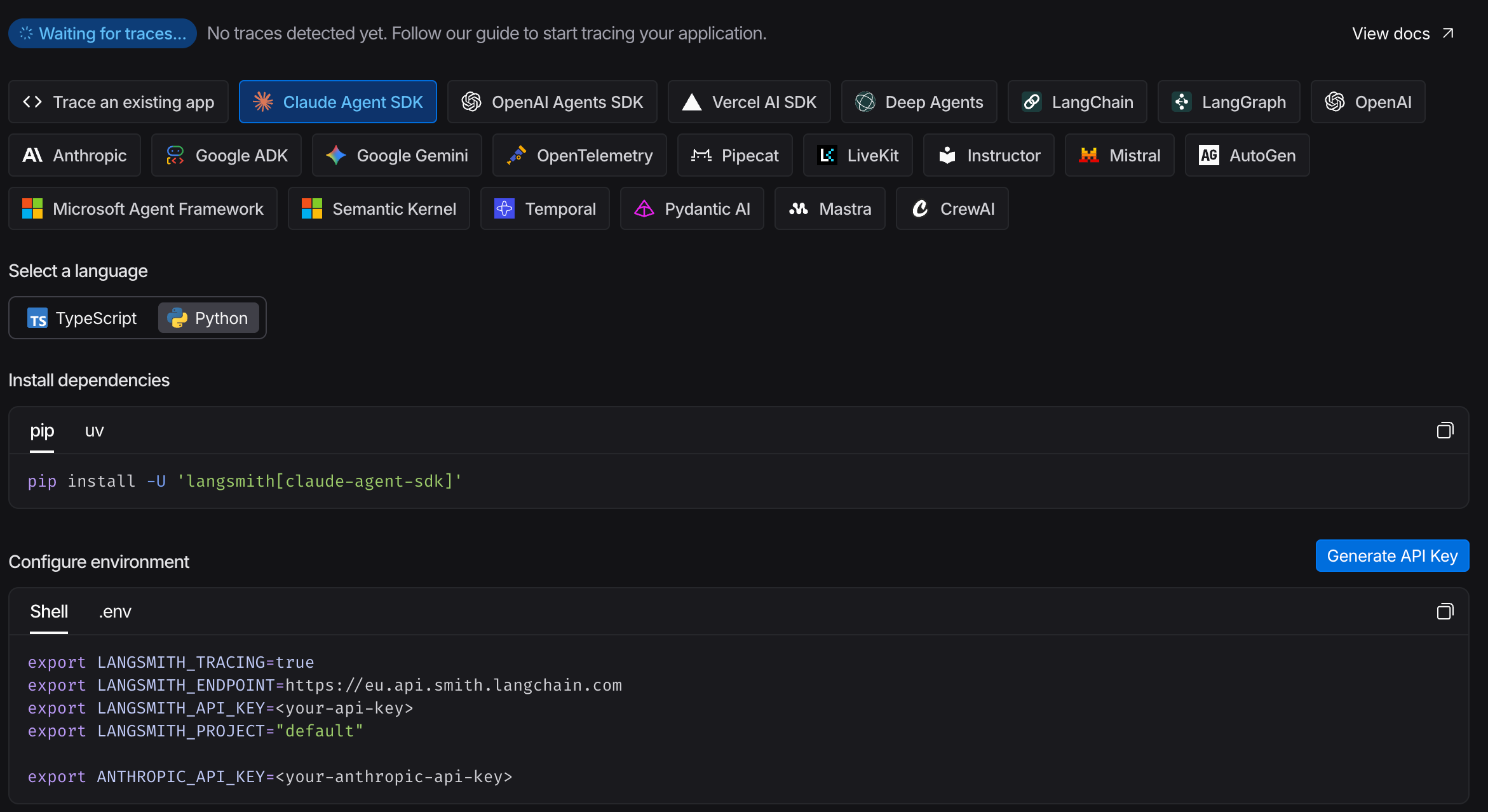
Modern systems rely on OpenTelemetry and AI Agents are no exception. Each agentic solution, be it Claude Code or LangGraph, OpenAI SDK or others support OTEL for sending traces, tool calls, LLM calls, costs, timings and other signals.
Configuring the agent can be as easy as providing the required environment variables if using a dedicated observability solution like LangSmith. Find the setup instructions there.
Guardrails
Traditional software is hard to operate well, and AI agents are no easier. To the integration and logic problems we add cost considerations, tools overusage, infinite loops problems and many more. Thus we need guardrails to solve them.
Guardrails typically operate at several layers. Input guardrails validate or sanitize user prompts to block prompt injections, malicious instructions, or sensitive data requests. Output guardrails inspect the model’s response before it is returned, filtering hallucinations, toxic content, policy violations, or unsafe instructions. Tool guardrails restrict how the agent can call external tools or APIs—for example enforcing schemas, permission checks, rate limits, and argument validation.
In agent frameworks such as LangChain, LangGraph, or OpenAI Agents SDK, guardrails are often implemented using middleware, structured output validation (e.g., JSON schema, Pydantic models), and policy engines. Some systems also add runtime monitoring and human-in-the-loop checkpoints for critical actions.
In practice, guardrails combine prompt policies, validation logic, security checks, and monitoring to ensure the agent remains reliable, safe, and aligned with application constraints.
Evaluation Harness
Traditional software quality relies on unit, integration, and end-to-end tests — all of them deterministic. AI agents are not. The same input can produce different outputs on different runs, which makes classical test assertions fragile. That doesn’t mean evaluation is impossible; it just requires a different toolkit.
Manual review is the baseline: run the agent against a set of representative inputs and inspect the outputs by hand. It’s slow, but it builds intuition and is the right starting point before you invest in automation.
LLM-as-judge scales manual review. You write an evaluation prompt describing what “good output” looks like, then feed the agent’s response to a second LLM and ask it to score or explain the result. This works well for subjective quality criteria — correctness, tone, completeness — that are hard to encode as assertions.
Deterministic assertions cover what you can pin down: does the agent call the right tools? Does the output contain required fields? Does it stay within token budget? These are your regression tests — fast, cheap, and automatable with any standard test runner.
Observability as a signal closes the loop in production. Tracking tool call frequency, latency, cost per run, and error rates over time surfaces regressions that no pre-deployment test would catch.
In practice, you layer all four: manual review to bootstrap a golden dataset, deterministic assertions for known-good behavior, LLM-as-judge for open-ended quality, and observability for production drift. Frameworks like LangSmith, Braintrust, and PromptFoo provide ready-made infrastructure for running and tracking these evaluations at scale.
Summary
An AI agent is not magic — it is a loop. An LLM decides what to do next; the execution environment carries out the decision, updates state, and feeds the result back. Repeat until done.
The components covered here — system prompt, tools, state, memory, observability, guardrails, and evaluation — are not optional extras. Each one addresses a failure mode that will surface in production. Skip the system prompt and the agent has no purpose. Skip guardrails and it will run up your API bill in an infinite loop. Skip evaluation and you won’t know when it breaks.
The good news: you don’t have to build this from scratch. Frameworks like LangGraph, OpenAI Agents SDK, and Claude Code handle the scaffolding. Your job is to define the goal, design the tools, and put guardrails around the things that matter.